UNIX tips
How to brick your Mac
- Install Mac OS X 10.4
- Install rEFIt
- Install Linux
- After some time decide to upgrade to Mac OS X 10.5 and at the same time make the partition bigger (e.g. by merging with a FAT32 partition which was originally intended to contain some Windows)
- Use the GNU Parted utility to delete the Mac OS X and FAT 32 partitions and create a new bigger partition for Mac OS X 10.5.
- Restart your Mac.
- Cheer that now you can no longer boot from the harddisk or a CD/DVD nor from anything else!
And now, how to un-brick it again:
- Call Apple support
- Find out that you are lucky and have some warranty left (6 days in my case!!!).
- Bring your Mac to an Authorized Service Provider.
- Get it back with a new harddisk :-)
Embed Flash into valid XHTML documents
<object type="application/x-shockwave-flash" data="flash.swf" width="100" height="200">

<param name="movie" value="flash.swf" />

</object>
How to enable IPv6 on your Debian Linux server in 3 easy steps
- Compute your 6to4 IPv6 address (2002:uuuu:vvvv::1) from your IPv4 address (a.b.c.d):
printf "2002:%02x%02x:%02x%02x::1\n" a b c d
- Add a SIT (IPv6-in-IPv4) interface in /etc/network/interfaces:
auto sit0

iface sit0 inet6 static

        address 2002:uuuu:vvvv::1

        netmask 64

        gateway ::192.88.99.1
ifup sit0
Now you can also add AAAA DNS records with 2002:uuuu:vvvv::1 for your domain(s).
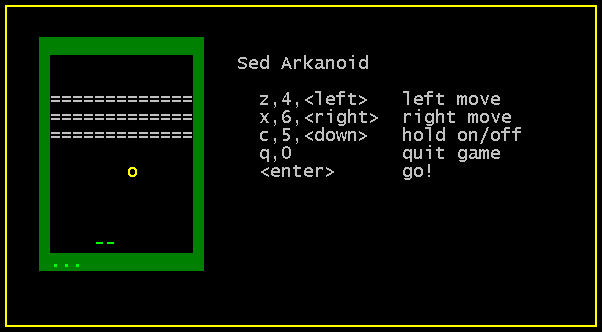
Breakout Game written in sed
Instead of learning for the exams, I mess around with strange things:
arkanoid.sed is a breakout-game written entirely in sed. Download the sed-file and use sed -f arkanoid.sed to start the game. (via)
7 Habits For Effective Text Editing 2.0
I really, really should have known the * command earlier.
Erlang has no locks and no keys.
Erlang processes don't share memory, so there is no need to lock the memory while it is being used. Where there are locks, there are keys that can get lost. What happens when you lose your keys? You panic and don't know what to do. That's what happens in software systems when you lose your keys and your locks go wrong.
Distributed software systems with locks and keys always go wrong.
Erlang has no locks and no keys.
Won't you blog about this song?
(via)
Enforce HTTPS for your virtualhosts
NameVirtualHost *:443
NameVirtualHost *:80

<VirtualHost *:80>
	ServerName example.org
	RewriteEngine on
	RewriteRule ^(.*)$ https://%{SERVER_NAME}$1 [L,R]
</VirtualHost>

<VirtualHost *:443>
	ServerName example.org
	DocumentRoot /var/www/example.org
	...
</VirtualHost>