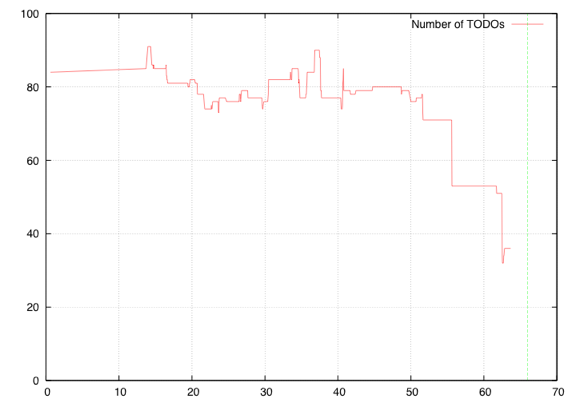
PDM TODO Performance
This comment on the Gmail problems made my day:
They're testing their new offline feature :)
(via)
Tagada Jones — Une fois de plus (Industrial Version)

Die Toten Hosen — Strom
The trial against The Pirate Bay that started today in Stockholm, Sweden are one of the most important issues of our time. Our adversaries basically wants to close down internets and remodel it into something similar of a sodamachine serving entertainment. During the trial, the prosecutor together with a coterie of representatives for a disabled business model will put up a tacky theater by telling stories designed to convince the court that The Pirate Bay infact is a menace to society.
What differs this trial from most earlier trials is that everything in and surrounding it will whirl round and round in diverse channels of communication; to be discussed, reinterpreted, copied and critizised. Every crack in their appeal will be penetrated by the gaze of thousands upon thousands of eyes on the internets, in all the channels covering the trial. Old cliches from the antipiracy lobby wont stick. You won’t be able to say stuff like, ”you can’t compete with free” or ”filesharing is theft” without a thousand voices making fun of you.
We will create numerous scenes where quite different plays will take place. In local channels like spectrial.bloggy.se where the immediate physical surroundings of the court are being discussed. ”Which cafés nearby will give us connection?” ”How can we get electricity to the bus?” But also in international channels like Twitter, where right now the torrent of information is being translated into fifteen different languages. Translations and coverage being made by ordinary users of internets. Volunteers sign up to make trial-tourist guides to the surroundings, drive the bus or hook up audio. People fly in from far away countries to cover the trial and tell the world their video story of the Sweden they see.
Here all participants are potential actors in the Spectrial. Our channels form a meltingpot of reporting and engagement.
Our communication around the spectacle aims in no way towards an objective report on an external chain of events. Rather, the trial is a hub around which a whole new network of actors is instigated. Neither is the spectacle a question of old media against digital, social medias. Our social medias include a paper fanzine and a 32 year old bus, connecting us and others physically.
It’s not about the protocols nor the technology. It’s about using these to create new congregations, where anyone is invited and anyone can find their role, build new scenes and make their own performances.
The future is built by us. Us who participate in conversations. The future is built by us who explore how information and performativity is coming together. To refuse a debate and still expect to be able to charge consumers is since long a closed door. To also try and outlaw certain types of conversations is downright disgraceful.
The coverage of the trial is not unique in these qualities. More and more areas see the creation of conversations on and the exploration of new stances on culture and cultural economy. A gigantic collective exploration has set sails. Every route differs from the other. But they have one thing in common: The industry interests that the state is representing are never present in these conversations. This is why they wont be part in building the future.
maintain hardline kopimi
The Bureau for Piracy and The Pirate Bay
via the internets
this article was translated by proud peers of The Pirate Bay trial.thepiratebay.org
(via)
☃
As EPFL is migrating all its E-Mail services to Exchange, lets use the Exchange functionalities of the iPhone/iPod touch.
Here's the configuration to make it work:

The following definition of an Array works without problems in Safari (and probably Firefox too), but triggers an (legitimate) error in Opera 9.25:
var myArray = [

 1.2,

 2.3,

 3.4,

];
The error is triggered by the superfluous comma after the last element of the Array. It may be argued for both behaviors, but I would prefer all Browsers accepting such an Array definition also since in other languages (C, Python, PHP) such a redundant comma does not cause any trouble.