Sunday, 5. October 2014 Week 40
The Cisco SMB SLM2008 Smart Switch does normally not support SNMP and there is also no setting in the configuration interface which would enable SNMP.
But nevertheless the firmware does actually contain a SNMP daemon. Thus it is not surprising that a smart guy on to the Cisco support forum found out how to manipulate the proprietary config file such that it enables the SNMP daemon:
- Configure your switch with everything you need
- Download enable_snmp.pl
- Run
# perl enable_snmp.pl <IP of your switch>
- Enjoy the SNMP export from the SLM2008 :-)
As this is a non-official hack, there are some limitations:
- The embedded SNMP daemon only supports read accces and no SNMP Traps.
- Changing a setting on the 'System' configuration tab disables the SNMP daemon again (thus the script will need to be run again).
Wednesday, 1. October 2014 Week 40
The Cyborgs - Electric Chair
The Cyborgs is a two man 'elektrock' boogie band.
Thank you Sat Rocks for showing me their music :-)
Sunday, 28. September 2014 Week 39
Today I did some cleanup of my legacy infrastructure. The repositories formerly located at cvs.x-way.org and svn.x-way.org have been converted to Git and are now available at git.x-way.org.
Also is git.x-way.org now no longer served by the old gitweb.cgi but by the fantastic GitBucket (a lightweight, self-contained GitHub clone written in Scala).
Tuesday, 23. September 2014 Week 39
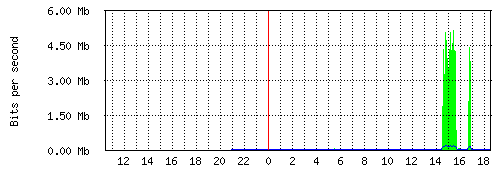
Since last week Netflix is also available in Switzerland. The future has arrived one could say.
Not only gives this easy access to TV shows and movies but also is this access provided via IPv6.
As you can see on the graph below, this brings IPv6 out of slumber and into primetime :-)
Swiss providers are probably seeing quite an increase in IPv6 traffic this month.
Thursday, 18. September 2014 Week 38
Octave Minds - Anthem
Octave Minds (via)
Friday, 12. September 2014 Week 37
The about page now features some fancy blog statistics, check it out :-)
The statistics are created with the help of Cal-Heatmap which allows to easily create calendar heatmaps similar to the activity heatmap of GitHub.
Update: couldn't stop playing around and thus added another chart, this time with the help of C3.js (a D3.js based reusable chart library).
Thursday, 4. September 2014 Week 36
SPA901 and SPA3102 phones can be rebooted by calling the following URL (which triggers an automatic config resync after the reboot):
http://<PHONEIP>/admin/reboot
Saturday, 30. August 2014 Week 35
The current configuration of an SPA901 phone can be downloaded like this:
http://<PHONEIP>/admin/spacfg.xml
For SPA3102 devices the URL is different:
http://<PHONEIP>/admin/config.xml
Friday, 25. July 2014 Week 30
Yesterday I switched our DSL Link to green.ch. Now we not only have a higher bandwidth (thanks to VDSL) but also native IPv6 connectivity!
Especially nice is that it all works out of the box. After plugging in the pre-configured FritzBox, it automatically gets an IPv6 prefix via Prefix Delegation and announces it to the clients in the LAN.
08:05 [ aj @ actuarius : ~ ] % mtr -rc5 www.open.ch
Start: Fri Jul 25 08:06:42 2014
HOST: actuarius.fritz.box         Loss%   Snt   Last   Avg  Best  Wrst StDev
  1.|-- fritz.box                  0.0%     5    0.8   0.8   0.7   0.8   0.0
  2.|-- 2a01:2a8::121              0.0%     5    8.6   8.7   8.5   9.2   0.0
  3.|-- 2a01:2a8:0:5a::1           0.0%     5    8.4   8.2   8.0   8.4   0.0
  4.|-- 2a01:2a8:1:7::4            0.0%     5    8.1   8.6   8.1   9.6   0.0
  5.|-- 2a00:db0:9:a06::5          0.0%     5    8.8   8.6   8.3   8.8   0.0
  6.|-- www.open.ch                0.0%     5    8.9   8.7   8.6   8.9   0.0
Tuesday, 3. June 2014 Week 23
12 years ago I started this weblog with a link to www.2advanced.com.
It's now 555 posts later and I think what is most unexpected (besides that this weblog is still existing 12 years later), is that this first link from my first post is still valid (and still pointing to some Flash-only website...).
So far this weblog has survived 2 different domains, 3 different servers, multiple versions of a self-made blogging-engine, about 6 different layout designs, a database-crash, recovery via archive.org and a migration to Jekyll.
No guarantee that it will last another 12 years, but for the meantime: Cheers, and enjoy the ride!