sibatable

Amazing food art by sibatable.
Besides the Instagram page and the ohou.se page check out the articles from Tapas and My Modern Met for more infos about the artist.
(via)
Amazing food art by sibatable.
Besides the Instagram page and the ohou.se page check out the articles from Tapas and My Modern Met for more infos about the artist.
(via)
Out of curiosity I wanted to know how much of my Internet traffic uses IPv6 vs the legacy IPv4.
There is no out-of-the-box graph for this in MikroTik.
Several forum and Stack Overflow posts suggest using ratelimiting queues with their graphing feature to collect this data.
After experimenting a bit, I ended up with the following configuration which creates two queues to collect the traffic data.
Important to know, traffic flows on a first-match basis through the queues. Thus the trick of having first the queue matching IPv6 traffic and then the queue matching all the remaining traffic.
Also, I use 10G as 'unreachable' traffic limit to avoid any traffic being ratelimited. This works well for my 1Gbit/s setup, but will need to be adjusted if you have a higher bandwidth.
/queue simple add limit-at=10G/10G max-limit=10G/10G name=v6-traffic queue=ethernet-default/ethernet-default target=2000::/3 total-queue=ethernet-default
/queue simple add limit-at=10G/10G max-limit=10G/10G name=v4-traffic queue=ethernet-default/ethernet-default target="" total-queue=ethernet-default
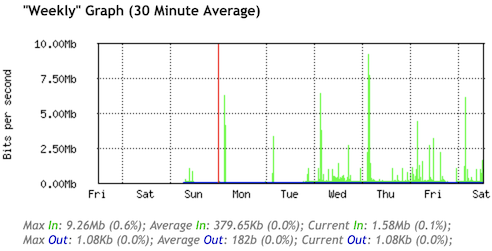
Having the queues in place for a couple days results in the following graphs:
IPv6 Traffic
IPv4 Traffic
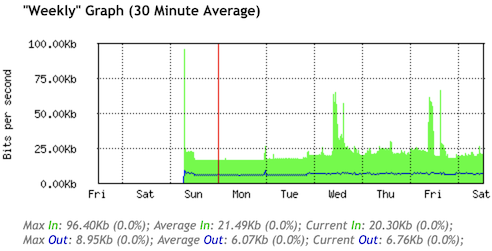
Happy to see that a large majority of my traffic uses IPv6 :-)
After the recent integration of Web Components in the blog, I made yet another stab at using some modern technologies.
This time inspired by the Ten years of A Single Div article, my focus was on the linear-gradient() and radial-gradient() CSS properties.
They can be combined to draw almost arbitrary shapes with pure CSS.
I used this to replace all graphics on andreas-jaggi.ch with CSS, while keeping the layout and functionality identical to the original 2005 version.
In the process of this, also some additional modern CSS features were used:
var() to simplify repeating CSS code.
animation/@keyframes to add a little fade-in effect on the hover text.
The recent article from Adrian Roselli explaining how to write a Web Component for YouTube and Vimeo videos, triggered me to finally adopt the Web Components technology for my blog.
Additionally there is Markus using Web Components for his blog since quite some time, which gave me confidence.
Implementing Web Components was now not only for the sake of learning about the technology, but also to address some longstanding painpoints I had with my embedded videos.
In particular did I not like that each embedded video triggered the loading of a plethora of third-party scripts and styles only to render the thumbnail image. And additionally this leaked tracking/cookie information to the video hosters (yes, I was using www.youtube-nocookie.com to reduce this as far as possible, but could not eliminate it completely).
Thus I added a <youtube-vimeo-embed> Web Component and changed all my embedded YouTube and Vimeo videos to use it.
My implementation is almost a 1:1 copy of the code provided by Adrian, with some minor adaptions (such as hiding the original link when the video iframe can be rendered and always enabling fullscreen mode in videos).
I'm quite happy with the outcome, as it provides some new benefits:
Except for the thumbnail image, no other third-party resources are loaded until someone clicks on the play button.
When JavaScript or Web Components are not supported by a browser, it gracefuly falls back to a simple link to the video.
Loading speed of the whole page improved quite a bit, as videos are only loaded on demand.
It always uses www.youtube-nocookie.com and third-party scripts are only loaded if someone explicitly clicks on the play button of a video :-)
While browsing posts from the past on the On this day page, I saw the one about blog.gs from 2002.
Turns out the blog.gs ping mechanism is still working in exactly the same way after all these years (nowadays operated by Automattic).
As I don't run my blog with PHP anymore, I added the following step at the end of my deploy script.
It uses curl to peform the XML-RPC call of the weblogUpdates.extendedPing API with the parameters for my weblog.
curl -X POST -v ping.blo.gs -H 'content-type: text/xml' --data '<?xml version="1.0"?><methodCall><methodName>weblogUpdates.extendedPing</methodName><params><param><value>x-log</value></param><param><value>https://blog.x-way.org/</value></param><param><value></value></param><param><value>https://blog.x-way.org/rss.xml</value></param></params></methodCall>'
Michael W Lucas is running a Kickstarter campaign to fund writing of book providing the knowledge to run your own mail server.
As I'm running my own mail server (coincidently with some of the tools that will be discussed in the book: Debian, Postfix, Dovecot), I do sympathize with this initiative and would recommend to support the campaign.
As seen all over the place, adding udm=14 to the URL of a Google search makes the result display less crappy (no ads, no AI suggestions to eat rocks or put glue on pizza, …).
The search results themselves of course are not really getting better with this, but at least the search experience is less annoying.
For the Desktop edition of Firefox you will need to use the udm14 extension to add the udm=14 parameter by default to your search bar.
For other browsers it should be enough to modify the settings of the search URL used and add the parameter (something like https://www.google.com/search?q=%s&udm=14).
Or even better, do use an alternative search engine :-)
In the Recent Docker BuildKit Features You're Missing Out On article, Martin Heinz lists some of the new features that have been added to Docker with the BuildKit introduction.
My favorite one is the debugger for failed build steps of a container:
export BUILDX_EXPERIMENTAL=1
docker buildx debug --invoke /bin/sh --on=error build .
Migrations are not something you can do rarely, or put off, or avoid; not if you are a growing company. Migrations are an ordinary fact of life.
Doing them swiftly, efficiently, and -- most of all -- *completely* is one of the most critical skills you can develop as a team.
— Charity Majors (via)
Brings back some faint memories of young me playing around with FrontPage (wondering why the preview rendering of an animated fullscreen background of a burning fire is making the computer go slow…)
(via)