Recover 12GB on your Mac
omlahore/RemoveMacAI: Turn off Apple Intelligence on macOS 27 and get its disk space back. One command, fully reversible.
(via)
omlahore/RemoveMacAI: Turn off Apple Intelligence on macOS 27 and get its disk space back. One command, fully reversible.
(via)
(via)
(via)
After upgrading to the latest stable RouterOS, I suddenly got many of the following log entries:
Sep  9 06:09:43 fw-router-1-wan.example.lan radvd,warning invalid mtu 1500 on vpn_tunnel_45 from fe80::1111:2222:3333
Sep  9 06:11:09 fw-router-1-wan.example.lan radvd,warning invalid mtu 1500 on vpn_tunnel_50 from fe80::4444:5555:6666:7777
Sep  9 06:14:26 fw-router-1-wan.example.lan radvd,warning invalid mtu 1500 on vpn_tunnel_51 from fe80::8888:9999:aaaa:bbbb
Sep  9 06:15:23 fw-router-1-wan.example.lan radvd,warning invalid mtu 1500 on vpn_tunnel_45 from fe80::1111:2222:3333
Turns out that for some reason (maybe some old manual config?), the following was configured on the devices:
/ipv6 nd
set [ find default=yes ] advertise-dns=yes hop-limit=64 mtu=1500
Thus to fix it, we need to set the mtu parameter to unspecified (so that MTU values are not added to the neighbor discovery messages and radvd stops complaining about the MTU missmatch):
/ipv6 nd set [ find default=yes ] mtu=unspecified
Mit ein paar Tagen Verspätung wünsche ich dem Journal von Markus alles Gute zum 25. Jubiläum.
Es ist immer wieder eine Freude einen neuen Post im Feedreader zu sehen.
Auch die kurzen Einträge auf GrumpyOldMan bringen mich regelmässig zum Schmunzeln 😊
Der Weblog auf kniebes.com (damals noch unter cyrus.ruhr.de, deep-resonance.org, kniebes.de und weiteren unterwegs) war eine der initialen Inspirationen welche mich selbst zum Weblog bauen/schreiben gebracht hatten.
Daher freut mich das Jubiläum umso mehr und ich bin gespannt auf die nächsten 25 Jahre! 🎉
I successfully jailbreaked my 14 year old Kindle Touch 🎉
This after support for it was ended by Amazon back in May.
Currently my plan is to use calibre to load new books onto it and KOReader to read them.
As a first step I jailbreaked the Kindle Touch and installed KOReader.
Guides for this were scattered and only focused on one part of the process.
So I ended up following the steps in this Reddit Comment, which worked flawlessly for me.
The guides on the Kindle Modding Wiki aren't very good for older Kindle models. Many people have problems with them.
I suggest factory resetting your Kindle, and then follow this guide:
1 - Update firmware
If your Kindle's firmware is already version 5.3.7.3, you don't need to do anything.
If it's lower than 5.3.7.3, follow the instructions here to update.
2 - Install jailbreak
Download the K5 JailBreak (5.0.x - 5.4.4.2) package from here and unpack it.
Find kindle-5.4-jailbreak.zip. It contains seven files:
bridge.conf
bridge.sh
developer.keystore
gandalf
jb.sh
json_simple-1.1.jar
Update_jb_$(cd mnt && cd us && sh jb.sh).bin
Copy those seven files to your Kindle's root directory.
Select the "update your kindle" option in the settings menu.
After the words **** JAILBREAK **** appear at the bottom of your screen, select the "restart" option in the settings menu and wait for the Kindle to restart.
3 - Install DevCerts Update
Download the DevCerts zip file from here.
Find the update file labeled "k5-ALL_keystore-install.bin" and copy it to your Kindle's root directory.
Select the "update your kindle" option in the settings menu
4 - Install KUAL
Download the "KUAL" package from here.
Find the "KUAL-KDK-2.0.azw2" file and copy it to your Kindle's documents folder.
5 - Install KOReader
Download "koreader-kindle-v*.zip" file from here. It contains two folders:
extensions
koreader
Copy those two folders to your Kindle's root directory.
6 - Use the KUAL entry in your Kindle's library to launch KOReader.
Had to chuckle quite a bit while reading this article: Dickovers, baggravation and botiquette: 18 new words to describe our tech hellscape 😂
Besides the initial Dickover, there are:
(via)
Will Dormann made a nice post with Firefox settings that a security-/privacy-conscious user may want to enable:
If anybody else is making the switch to (or back to) Firefox, there are a few settings that a security-/privacy-conscious user may want to enable:
- Enable the
Block AI enhancementstoggle to disable all AI-related nonsense globally.- Disable Telemetry & Data Collection.
- Disable "Firefox Home"
- Use "Strict" tracking protection
- Enable HTTPS-only mode
Bonus:
Inabout:config, set:
privacy.resistFingerprinting:truemedia.peerconnection.enabled:falsegeo.enabled:false
Try staying still and "doing nothing" when your head is a beehive of thoughts, ideas, emotions, intentions, and desires.
Sadly, I often end up scrolling.
It gives the illusion of "stopping", but it doesn't help the beehive.
So I have a collection of "rest activities". Jigsaw puzzles. Listen to a podcast or watch a TV series. Read a book. Listen to a song. Physical activity of course, but that's off the table, particularly with this heat.
I'm going to add writing.
Not for the content, but for giving my brain a linear experience without input. Because input feeds the bees.
Stephanie Booth shares her handwritten (!) thoughts on a particular activity to help slow down: Making the Bees Walk in Line
Another fun Vim learning game. Refreshed my memory about f and ; 🍦
Another quick trick from Practical Betterments: Create a default folder for screenshots
- Press
Shift+Command+5to open the screen capture interface.- Click the
Optionsdropdown.- Under
Save toselectOther location…. This will open up Finder.- Navigate to the location you want to save the screenshots to — e.g. Documents.
- Click
New Folderand name the folderScreenshotsor whatever you want.- Click
Choose. That's it!
A handy guide by Nathanael to help reducing your iCloud data usage: Channel your anger at big tech into a cloud storage saving session
I especially liked the part about using the Photos App to automatically bring up a list of pictures of receipts.
This way I could easily delete all the business travel expense pictures that accumulated over the years 🧹
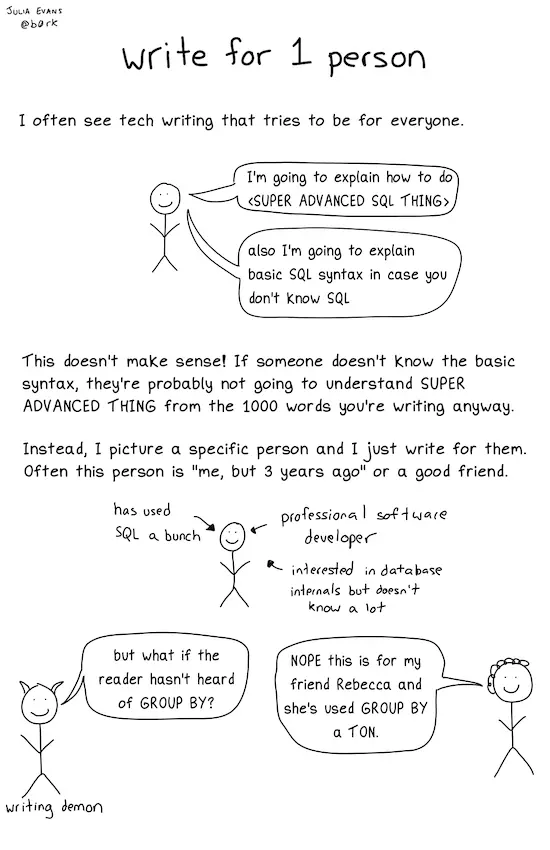
[...] Instead, I picture a specific person and I just write for them. Often this person is "me, but 3 years ago" or a good friend.
Great writing advice from Julia Evans.
(via)
Since the end of last month, I no longer see new podcast episodes for a podcast that produces daily episodes.
No amount of refreshing or unsubscribing/re-subscribing helped so far.
Especially annoying is that the episodes are there when searching for them, but do not show up in the subscribed podcast while episodes of other podcasts show up without any issues.
Today I finally found a way to fix it:
Volker explains in a post how he uses the Brave Browser.
The DuckDuckGo No-AI Search extension sounds intrigueing and thus I installed it for my Brave Browser.
Will see how this performs in the long term and hopefully improves my personal web search experience.
Happy 24th birthday, x-log 🥳
Nice writeup by Alex, how to render a chat thread in CSS: Rendering a chat thread in CSS and JavaScript
Might be fun to try this on a future re-design of the blog 🤔
A choose-your-own-adventure guide to understanding, deploying, and supporting passkeys
(via)
Disable Apple Creator Studio update popup in iWork (Keynote, Pages, Numbers)
defaults write com.apple.iWork.Pages TSADisableUpdateNotifications -bool yes
defaults write com.apple.iWork.Keynote TSADisableUpdateNotifications -bool yes
defaults write com.apple.iWork.Numbers TSADisableUpdateNotifications -bool yes
(via)
Passweird - Passwords too Gross to Steal
This website will create for you passwords that are not only secure*, but also so utterly repulsive that not even the most hardened criminal, identity thief, NSA agent, or jealous boyfriend would ever want to use them.
(via)
The Multiple URLs in Git Remote article explaines how git handles multiple URLs.
Biggest takeaway for me is that you can have git push transparently push to two URLs at the same time.
Might become handy in all the ongoing discussions about GitHub reliability…
Blog Quest is a Firefox extension by Robert Alexander that quietly collects RSS feeds when you surf the web.
I like the idea of passively collecting feeds of websites I potentially find interesting, all while preserving my privacy and being unintrusive (no notifications, popups or similar).
Installed it today and already looking forward to review my surfing from time to time 😎
zkbro explains in a post how to configure Librewolf.
One of the mentioned add-ons catched my eye: Google Sign-in Popup Blocker
This should block the annoying sign-in with Google dialogs that popup on some websites.
As this sounds promising, I installed the add-on in my Firefox.
I briefly tested it on a site that uses the annoying sign-in with Google dialog, and this time the dialog did not appear.
To be sure I confirmed it in the developer tools where it mentioned that loading the dialog was blocked by the add-on 🎉
Well written article by Redowan Delowar, explaining how to achieve type-safe logging with Go's log/slog library.
- Take the logger as a constructor argument. Never reach for
slog.Default()or any package-level slog function.- Always use
logger.LogAttrs(ctx, level, msg, attrs...). Notlogger.Info,logger.Warn, or any of the kv-flavored helpers.- Every attribute comes from a helper in
internal/log/attrs.go. Writeapplog.OrderID(o.ID), neverslog.String("order_id", o.ID)inline.- sloglint enforces all three on every commit so the workflow doesn’t erode.
"Nothing" is the secret to structuring your work is a very nice article from Steven van Gemert outlining a simple approach to reduce mental baggage and increase focus.
The next time you begin your workday, try this: clear your work surface completely. Close all browser tabs. Create a fresh page in your notebook. Open only the one file you need.
It might feel strange or even scary at first. But notice what happens. Notice how much easier it is to focus. Notice how clearly you can see when you're actually done with something. Notice how much less mental energy you spend managing the chaos.
The world will always be messy. You can't control that. But you can control your work surface. And nothing, that small space of perfect order, is where your best work begins.
Also I felt a bit attacked by this analogy 😅
For example: closets are for storing clothes. Chairs are for sitting on, not storing clothes. Floors are for walking on, not storing clothes. In the same logic, work surfaces are for working, not for storage.
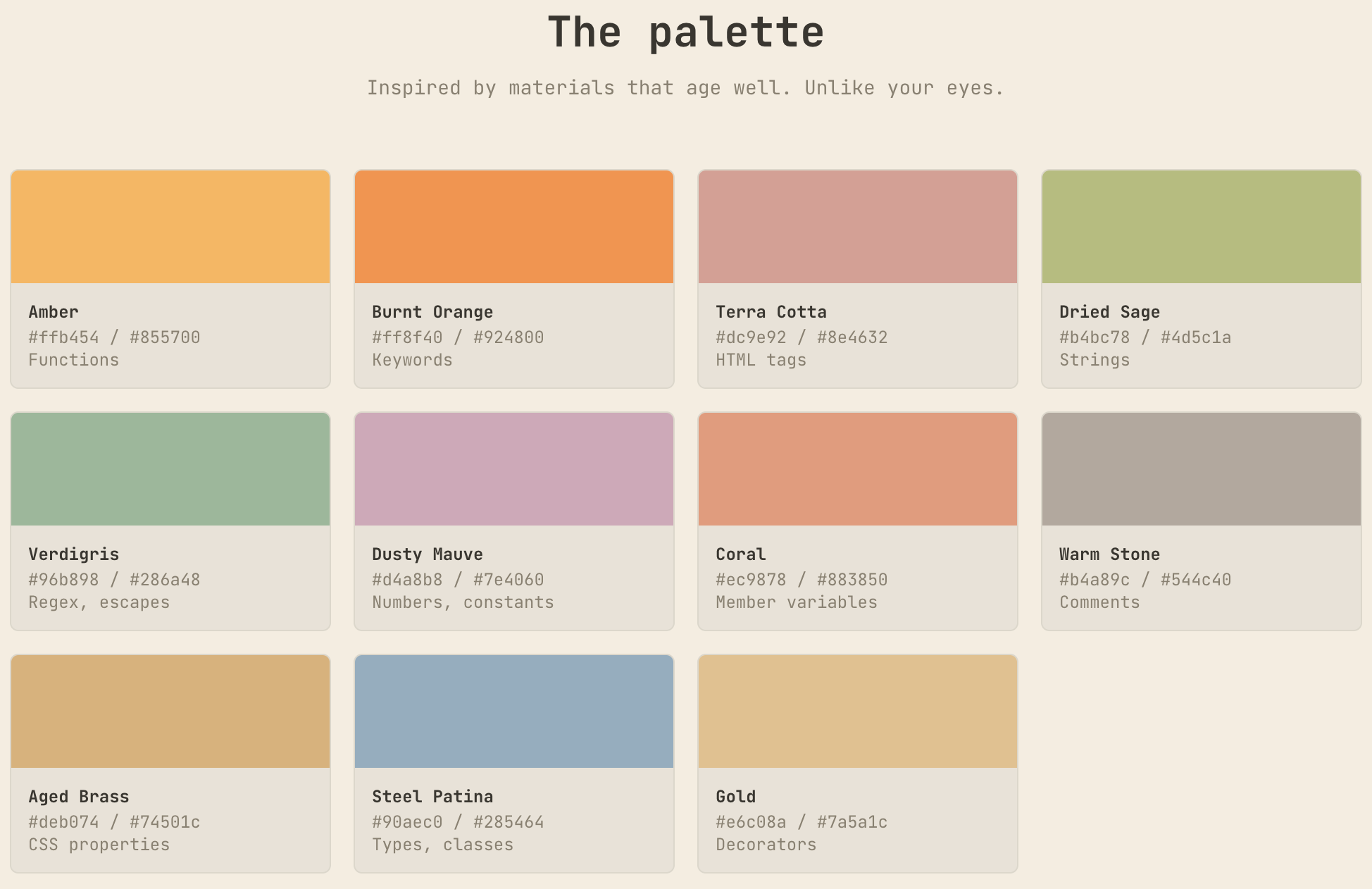
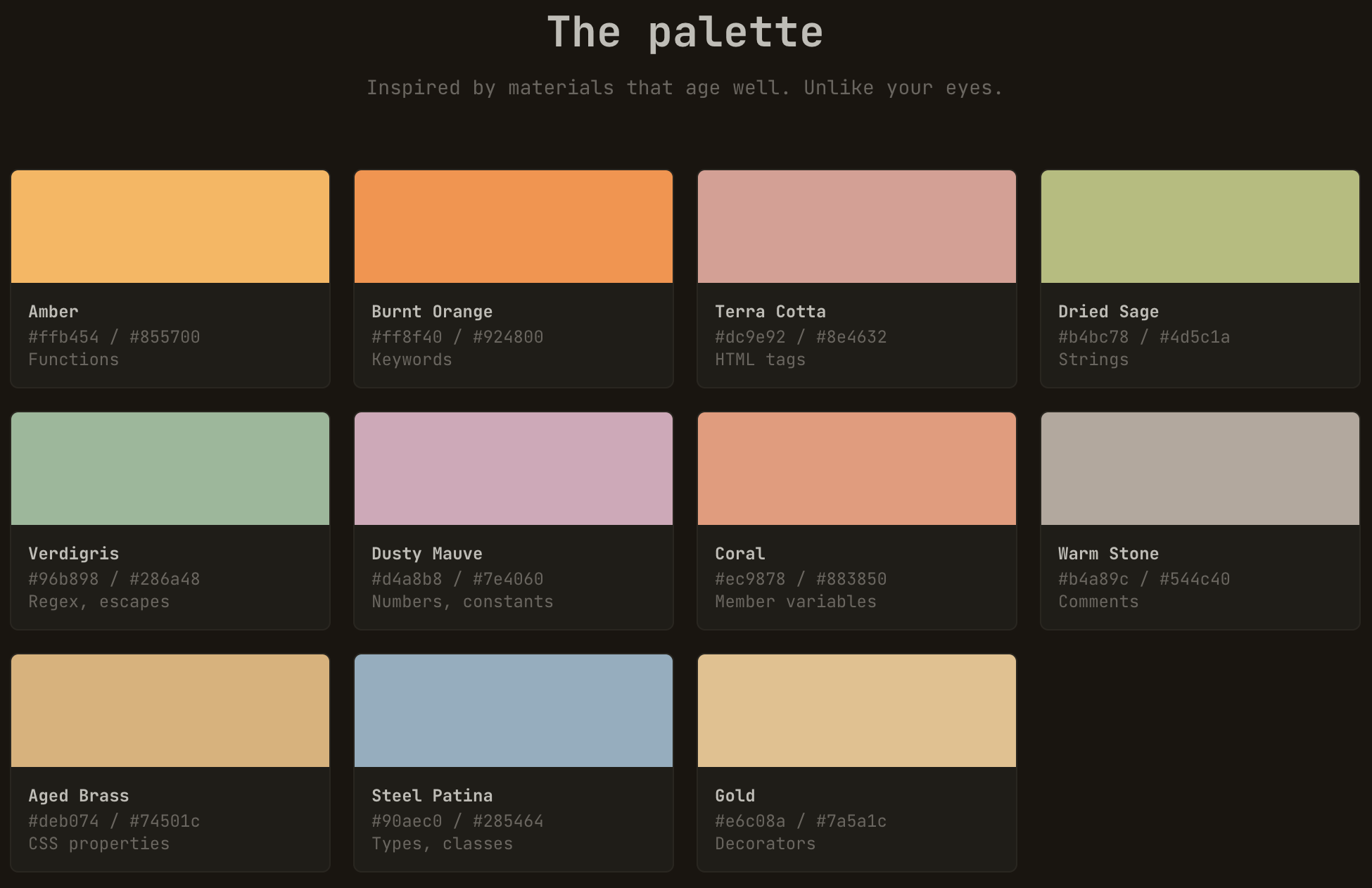
Warm Burnout — A warm, contrast-audited color theme suite. Mostly warm palette, one cool type accent, WCAG AAA dark and AA light variants. For developers who are already burned out but still have deadlines.
Built on one premise: your eyes have been bullied enough by radioactive blue themes. Warm Burnout is a mostly warm syntax palette with one cool steel-blue accent for types and WCAG-audited contrast.
LangApp is a cute little webapp to learn Bernese Swiss German (Bärndütsch). 🧸
Some things I’ve learned/am learning:
• 99% of things aren’t about you.
• Only you can complete you.
• Let people enjoy things.
• Kindness is imperative.
• Actions > words.
• Stop, look, & listen.
• Love others. You’ll grow.
• Laugh like it’s your job.
• Never stop learning.
(via)
Email address obfuscation: What works in 2026?
Here are some of the best techniques for keeping email addresses hidden from spammers—along with the statistics on how likely they are to be broken.
(via)
Today is CSS Naked Day.
Enjoy the blog without any CSS 😎 (CSS should come back again tomorrow).
(via)
With the following ethtool command you can make an individual network port blink.
Can come in handy with the ever changing interface naming conventions of newer Linux distributions.
ethtool -p <interfacename>
How to Create Wavy Shapes & Patterns in CSS
(via)
Go the right way: the Zen of Go coding
- Write packages, not programs
- Test everything
- Write code for reading
- Be safe by default
- Wrap errors, don’t flatten
- Avoid mutable global state
- Use (structured) concurrency sparingly
- Decouple code from environment
- Design for errors
- Log only actionable information
The security engineer in me especially likes the pointer to the os.Root API to avoid path traversal attacks 🔐
Recently I needed to extend/increase a LVM partition to give it more space:
The work moved. It didn't disappear. Whether your organization thrives or drowns depends on whether you've moved with it upstream into design, specifications, guardrails, and the messy human work of reducing ambiguity, or whether you're still standing where the code used to be, wondering why everything feels faster and worse at the same time.
An introduction to the Human web, and how one can be a part of it.
(via)
Best Practices for Claude Code contains a lot of high-value tips when using agentic coding (most of them apply not only to Claude Code).
Very helpful and reflects my experience using agentic coding tools.
(via)
In some rare cases you might need to copy a file from a VM in Qubes OS to Dom0.
This can be done with the following command in a Dom0 console:
qvm-run --pass-io my-vm 'cat /path/to/file/in/my-vm/file.doc' > /path/fo/file/in/dom0/file.doc
I made some config changes to the .screenrc and wanted to directly apply them to the running Screen without restarting.
Turns out one can trigger a reload of the config inside a running Screen session:
CTRL+a :source ~/.screenrc
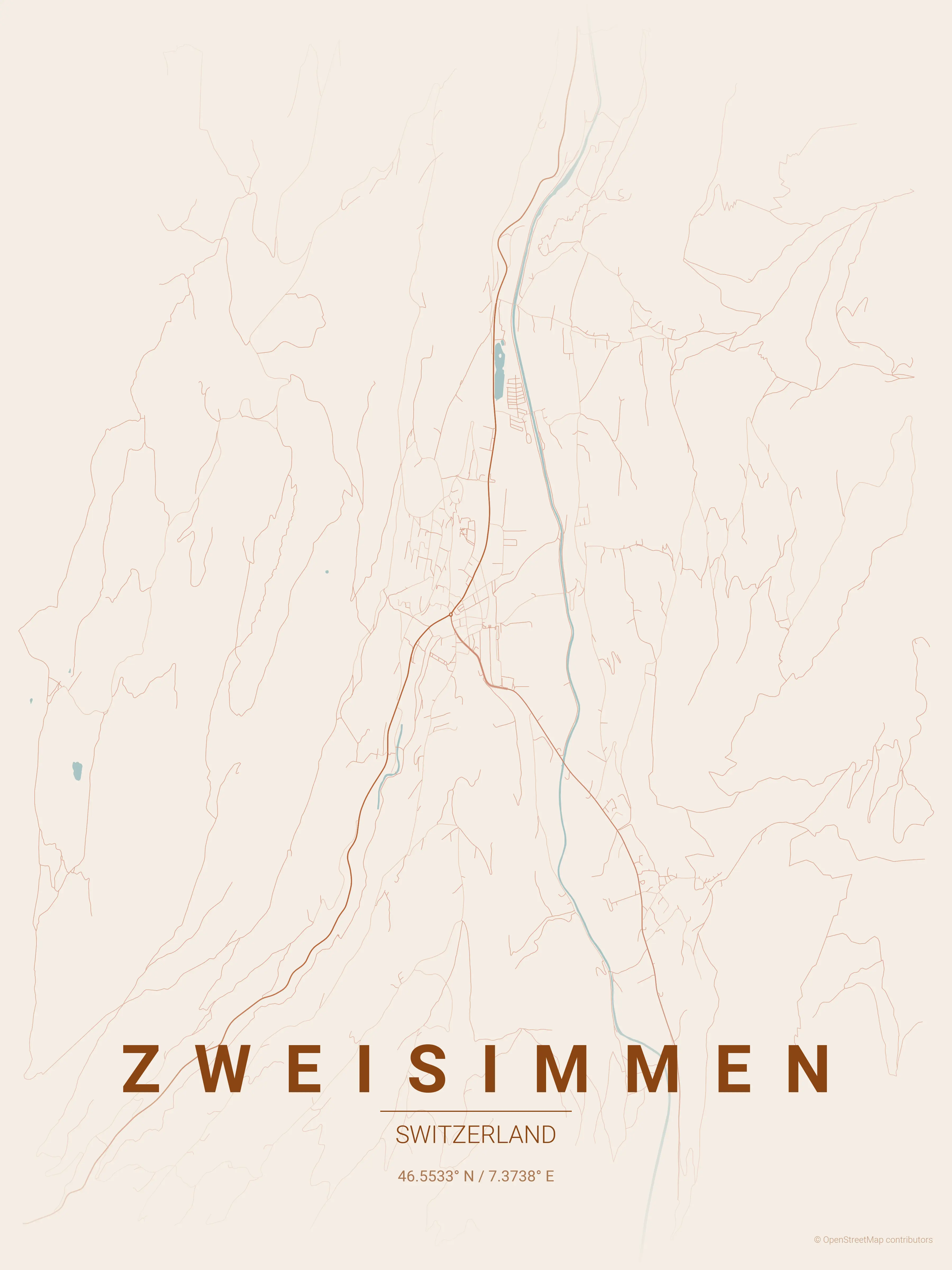
This Github project from Ankur Gupta allows you to "generate beautiful, minimalist map posters for any city in the world".
You can install the Python scripts on your computer or use this website.
(via)
Had to work with some machine generated XML files.
To make them more readable, I looked for a way to format and indent them in Vim.
There are many tools for this, I stumbled upon xmllint which also validates the XML.
This can be useful, but restricts it to formatting valid XML files only.
:%!xmllint --format %
Simulating Crop Marks is a fun CSS experiment.
It uses html::before/after body::before/after together with some background: linear-gradient magic to draw crop marks around a website.
(via)
Two very interesting blog posts explaining how Alex manages multi-factor recovery codes and memorises passwords:
But enabling MFA isn’t everything – what if you lose access to that second factor? For example, I store my MFA codes in an app on my phone. What happens if my phone is broken or stolen?
I generally trust my password manager, but I don’t want it to be a single point of failure for my entire digital life.
Sad and devastated. Wish strength to all.